FUSION: Improving Mobile Bug Reporting
Team Members: Kevin Moran, Mario Linares-Vásquez, Carlos Bernal-Cárdenas, & Denys Poshyvanyk
College of William & Mary --- SEMERU

Purpose
This project was created by the Software Engineering Maintenance and Evolution Research Unit (SEMERU) at the College of William & Mary, under the supervision of Dr. Denys Poshyvanyk. The major goal of the FUSION project is provide a more effective means of off-device bug reporting for Android applications that facilitates reporting through auto-completion, and provides detailed information to developers to aid in bug reproduction. In the future we hope to build out the tool to provide fault location capabilities and bug fixing suggestions.
Publications
FUSION: A Tool for Facilitating and Augmenting Android Bug Reporting
‣ Kevin Moran, Mario Linares-Vásquez, Carlos Bernal-Cárdenas, and Denys Poshyvanyk
‣ Proceedings of 38thACM/IEEE International Conference on Software Engineering (ICSE’16), Formal Research Tool Demonstration Track, Austin, TX, May 14-22, 2016, pp. 609-612 (32% Acceptance Rate)
‣ [pdf | software & data | slides]
Auto-Completing Bug Reports for Android Applications
‣ Kevin Moran, Mario Linares-Vásquez, Carlos Bernal-Cárdenas, and Denys Poshyvanyk
‣ Proceedings of 10th Joint Meeting of the European Software Engineering Conference and the 23rd ACM SIGSOFT Symposium on the Foundations of Software Engineering (ESEC/FSE’15), Bergamo, Italy, August 31-September 4, 2015, pp. 673-686 (25.4% Acceptance Rate)
‣ [pdf | software & data | slides]
Enhancing Android Application Bug Reporting - 🏆 Second Place Graduate Student in ACM SRC
‣ Kevin Moran
‣ Proceedings of 10th Joint Meeting of the European Software Engineering Conference and the 23rd ACM SIGSOFT Symposium on the Foundations of Software Engineering (ESEC/FSE’15), Student Research Competition (SRC), Bergamo, Italy, August 31-September 4, 2015, pp. 1045-1047
‣ [pdf | tool & data | poster]
Replication Package -FSE'15
This replication package contains the following items:
- An overview of the results presented in the paper.
- Access to all of the data generated from the User Studies used to evaluate FUSION, along with instructions on how to interpret and use the data.
FUSION
FUSION Workflow Overview
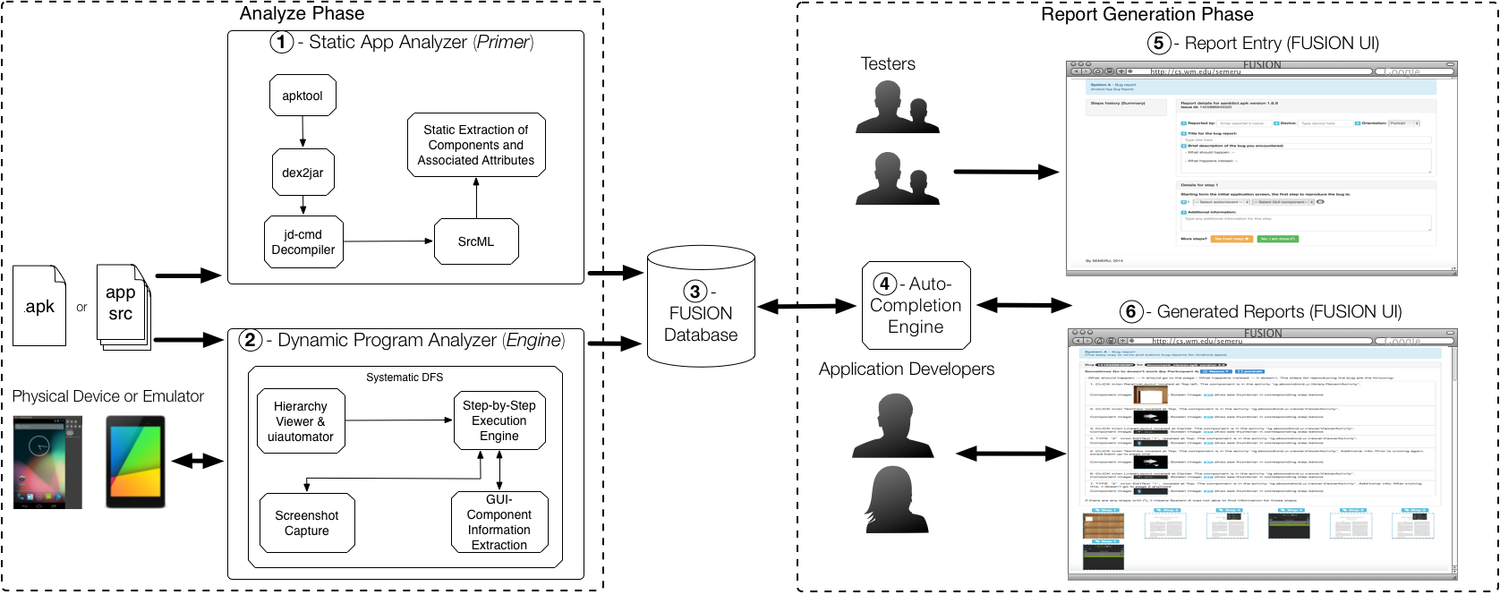
FUSION Workflow Overview (Click for more detail)
FUSION’s Analyze → Generate workflow corresponds to two major phases. In the Analyze Phase FUSION collects information related to the GUI components and event flow of an app through a combination of static and dynamic analysis. Our Static Analyzer (Primer) extracts all of the GUI-components and associated information from the app source code. Specifically it extracts (i) the possible actions on the component, (ii) the type of component (e.g. Button, Spinner), (iii) the activities the component is instantiated within, and (iv) the class files where the component is instantiated. Our Dynamic Program Analyzer (Engine) explores Android apps in a systematic fashion recording runtime information about actions and GUI components. In the Report Generation Phase FUSION takes advantage of the GUI centric nature of mobile apps to both auto-complete the steps to reproduce the bug and augment each step with contextual application information. The overall design of FUSION can be seen in the Figure above.
When a user visits the FUSION web interface, they fill out basic information about the bug they are reporting, and then report detailed reproduction steps based on auto-completion suggestions gleaned from the static and dynamic analysis. However, due to limitations in FUSION's dynamic exploration, not every state of an application is explored, and therefore there may be steps missed. The FUSION back-end auto-completion engine is able to handle these model gaps and uses the following decision tree to make suggestions to the user. (For more detailed information about FUSION, please refer to our paper)
Tools used for FUSION Implementation
We provide the tools we used in our implementation of the Dynamic Program Analyzer (Engine), Static App Analyzer (Primer), and Web Interface.
Tools used to implement the static analyzer (Primer):
- APKTool: a tool for reverse engineering Android apk files.
- Dex2jar: A conversion tool for .dex files and .class files.
- jd-cmd: A command line Java Decompiler.
Tools used to implement the Dynamic Program Analyzer (Engine):
- Android Debug Bridge (adb): A universal tool for communicating with Android devices and emulators
- Hierarchy Viewer: A tool for examining and optimizing Android user interfaces.
- UIAutomator: A tool that provides a set of APIs to build UI tests for Android applications and aid in interacting with GUI Components.
tools used to Implement the Fusion web interface:
- Bootstrap: HTML, CSS, and JavaScript framework for developing web applications.
- MySQL: Robust Relational Database.
Using FUSION
We have launched a live web-version of our bug reporting system for the 14 different applications evaluated in our paper. The web-version is the same piece of software used by the participants in our user studies. There are two main components to the online reporting system: 1) The Reporting System, and 2) the Report Viewer. The Reporting System allows users to submit a new bug report for any of the apps currently supported by FUSION. The Report Viewer allows for the viewing of any report submitted through the system, including those reports generated by the user study participants.
click here to access the reporting system
click here to access the report viewer
FUSION Documentation
To support replication of the experiments conducted to evaluate FUSION, we provide documentation for both the The Reporting System and the Report Viewer. Please click the button below to download the FUSION documentation.
FUSION Replication Package
In this section we provide a description of the studies conducted to evaluate FUSION and make all of the data available for replication purposes and further research. (Please note that this section contains results not explicitly discussed in our paper due to space limitations)
Research Questions
RQ1: What types of information fields do developers/testers consider important to be available when reporting bugs in Android?
RQ2: Is FUSION easier to use for reporting bugs than traditional bug tracking systems?
RQ3: Are FUSION Reports easier to use for reproducing bugs than traditional bug reports?
RQ4: Do reports generated with FUSION allow for faster bug reproduction compared to reports submitted using traditional bug tracking systems?
RQ5: Do developers using FUSION reproduce more bugs compared to traditional bug tracking systems?
Study Descriptions
study 1: Reporting Bugs with FUSION
The goal of the first study is to assess whether FUSION’s features are useful when reporting bugs for Android apps, which aims to answer RQ1 & RQ2. In particular, we want to identify if the auto-completion steps and in-situ screenshot features are useful when reporting bugs. For this, we recruited eight students (four undergraduate or non-experts and four graduate or experts) at the College of William and Mary to construct bug reports using FUSION and Google Code Issue Tracker (GCIT) — as a representative of traditional bug tracking systems— for the real world bugs shown in the table below. The four graduate participants had extensive programming backgrounds. Four participants constructed a bug report for each of the 15 bugs in Table 2 using FUSION prototype, and four participants reported bugs using the Google Code Issue Tracker Interface. The participants were distributed to the systems to have non-experts and experienced programmers evaluating both systems. In total the participants constructed 60 bug reports using FUSION and 60 using GCIT. Participants used a Nexus 7 tablet with Android 4.4.3 KitKat installed to reproduce the bugs. To avoid bias, participants watched videos that illustrated the bug being manifested on a Nexus 7 tablet. We collected the time it took each participant to report each bug as well as the answers to the User Preference and Usability questions below.
Study 1 User PREFERENCE Questions
| Question ID | Question |
|---|---|
| S1UP1 | What fields in the form did you find useful when reporting the bug? |
| S1UP2 (FUSION ONLY) | Were the component suggestions accurate? |
| S1UP3 (FUSION ONLY) | Were the screenshot suggestions accurate? |
| S1UP4 | What information if any were you not able to report? |
| S1UP5 | What elements do you like most from the system? |
| S1UP6 | What elements do you like least in the system? |
| S1UP7 | Please give any additional feedback about the bug reporting system? |
Study 1 Usability questions
| Question ID | Question |
|---|---|
| S1UX1 | I think that I would like to use (system) frequently. |
| S1UX2 | I found (system) very cumbersome to use. |
| S1UX3 | I found the various functions in (system) were well integrated. |
| S1UX4 | I thought (system) was easy to use. |
| S1UX5 | I found (system) unnecessarily complex. |
| S1UX6 | I thought (system) was really useful for reporting a bug. |
Study 2: Reproducibility of FUSION Bug REports
The goal of Study 2 is to evaluate the ability of FUSION to improve the reproducibility of bug reports, in turn answering research questions RQ3-RQ5. In particular, we evaluated the following aspects in FUSION and traditional issue trackers: 1) usability when using the bug tracking systems’ GUIs for reading bug reports, 2) time required to reproduce reals bugs by using the bug reports, and 3) number of bugs that were successfully reproduced. The reports generated during Study 1, using FUSION and GCIT, in addition to the original bug reports (Table 2) were evaluated by a new set of participants by attempting to reproduce the bugs on physical devices. The usability was evaluated by using statements based on the SUS usability scale by John Brooke [link]. These statements can be found in the attached data files. For the evaluation we enlisted 20 new participants, none of which participated in the first study. The participants were graduate students from the Computer Science Department at College of William and Mary, all of whom are familiar with the Android platform. All participants were compensated $15 USD for their efforts. Each user evaluated 15 bug reports, six from FUSION, six from GCIT, and three original. 135 reports were evaluated (120 from Study 1 plus the 15 original bug reports), and were distributed to the 20 participants in such a way that each bug report was evaluated by two different participants (the full design matrix can be found in the attached files). Bug reports produced by both experienced [FUS(E), GCIT(E)] and inexperienced participants [FUS(I), GCIT(I)] from the first study were evenly distributed across the six reports evaluated by each participant for the FUSION and GCIT systems. (For more details on these studies please refer to our paper)
Study 2 User Preference Questions
| Question ID | Question |
|---|---|
| S2UP1 | What information from this type of Bug Report did you find useful for reproducing the bug? |
| S2UP2 | What other information if any would you like to see in this type of bug report? |
| S2UP3 | What elements did you like the most from this type of bug report? |
| S2UP4 | What information did you like least from this type of bug report? |
Study 2 Usability Questions
| Question ID | Question |
|---|---|
| S2UX1 | I think that I would like to use this type of bug report frequently. |
| S2UX2 | I found this type of bug report unnessecarily complex. |
| S2UX3 | I thought this type of bug report was easy to read/understand. |
| S2UX4 | I found this type of bug report very cumbersome to read. |
| S2UX5 | I thought the bug report was really useful for reproducing the bug. |
Graphs and Figures
Study 1 UX Question Responses
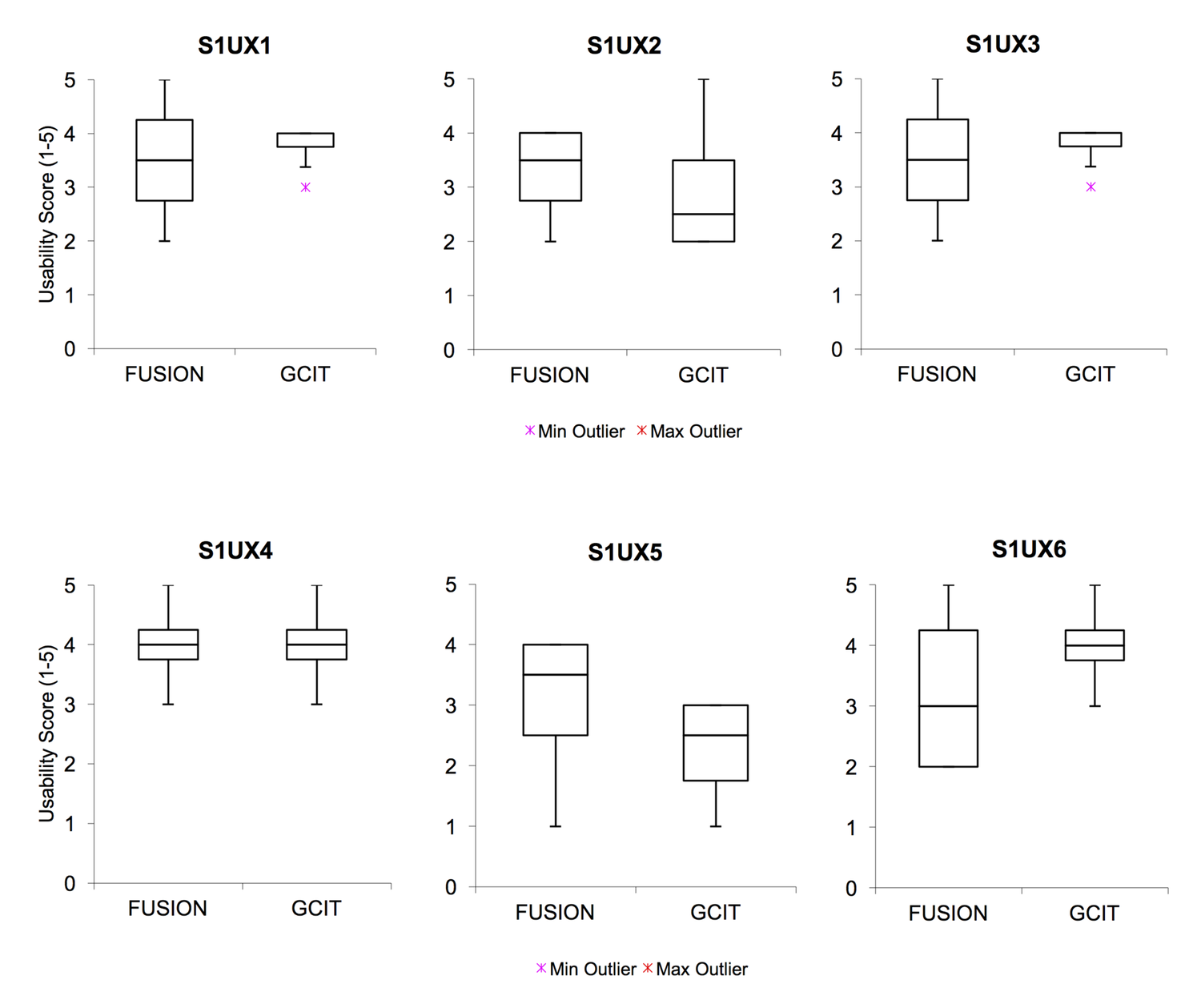
Study 1 Bug Creation Time Statistics (EX = Experienced USer IEX= Inexperienced USer)
| Partcipant 1 (EX) | Participant 2 (EX) | Participant 3 (IEX) | Participant 4 (IEX) | |
|---|---|---|---|---|
| FUSION | 5:14 | 5:20 | 10:40 | 4:59 |
| Partcipant 5 (EX) | Participant 6 (EX) | Participant 7 (IEX) | Participant 8 (IEX) | |
| GCIT | 3:17 | 6:39 | 1:14 | 1:46 |
Study 2 User Experience responses
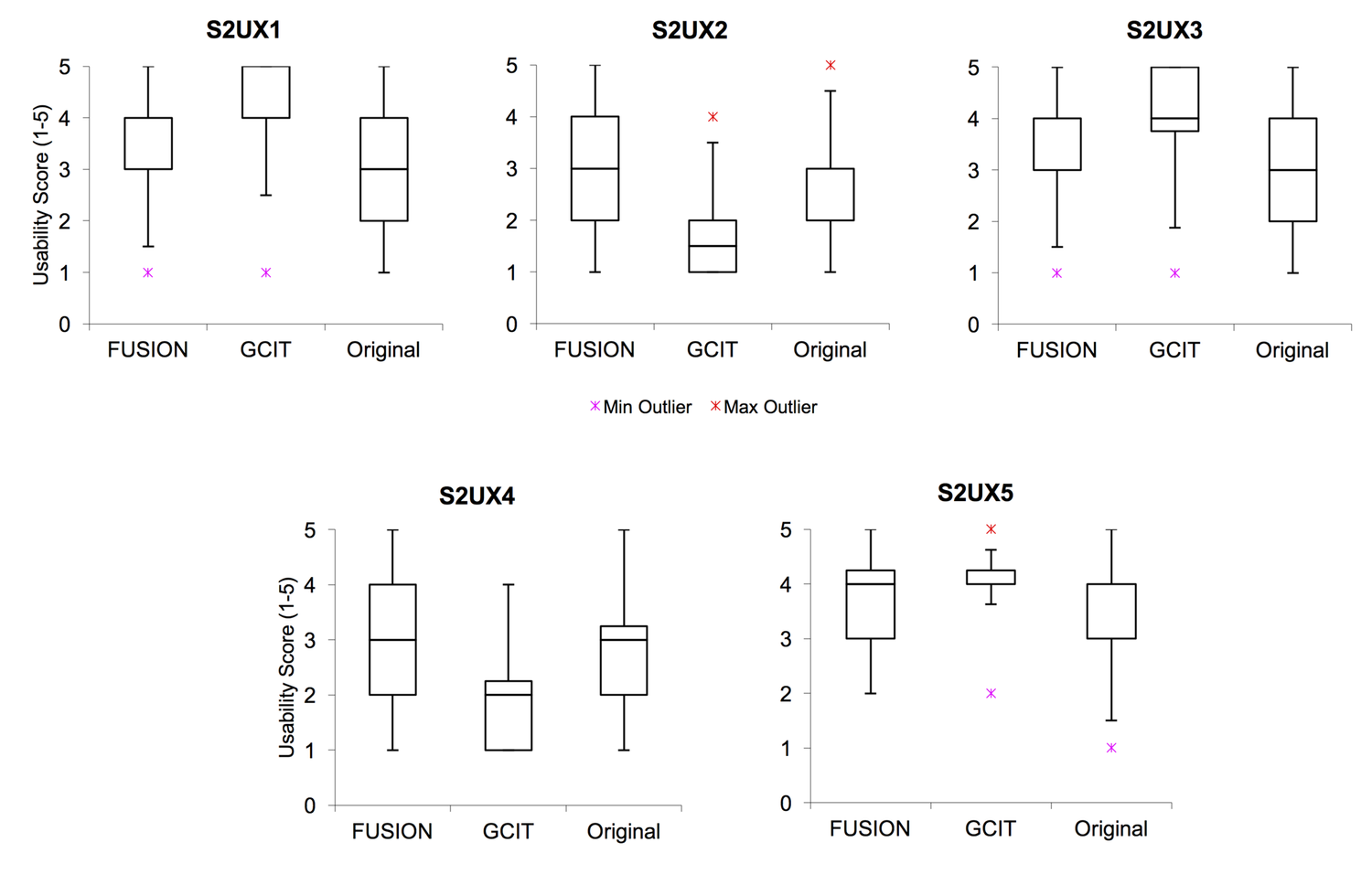
Study 2 Bug Reproduction results
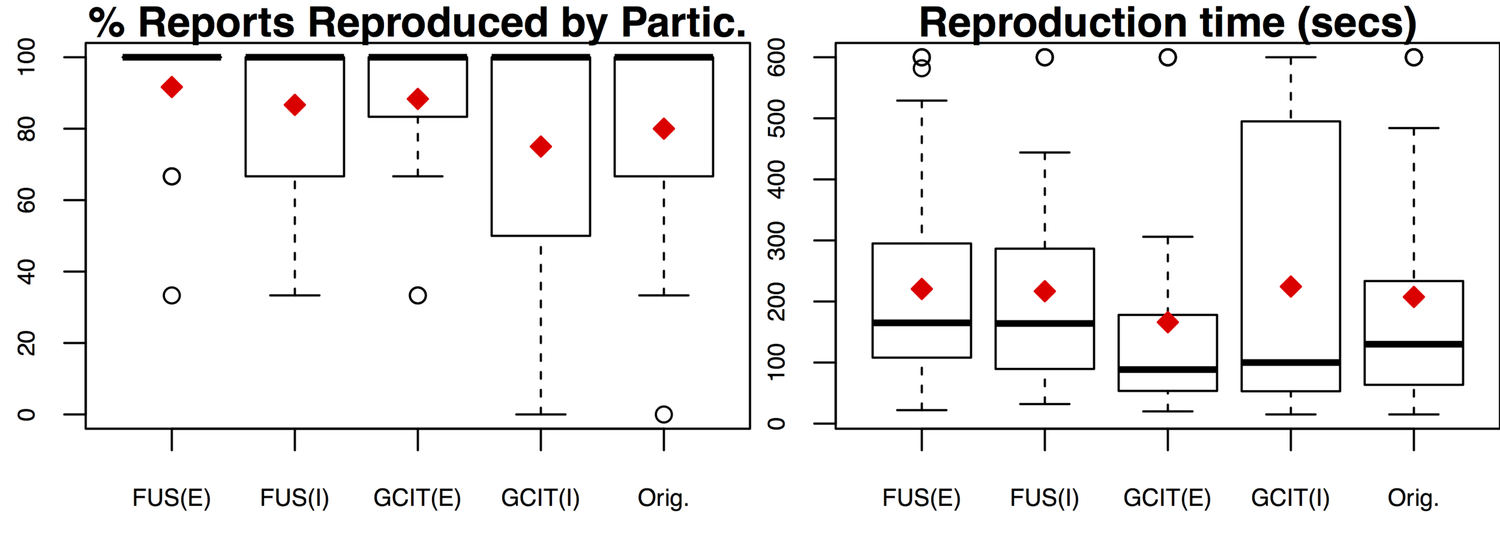
Answers to Research Questions
RQ1: While reporter’s generally felt that the opportunity to enter extra information in a bug report using FUSION increased the quality of their reports, inexperienced users would have preferred a simpler web UI.
RQ2: According to usability scores, participants generally preferred FUSION over the original bug reports, but generally preferred GCIT to FUSION by a small margin. The biggest reporter complaint regarding FUSION was the organization of information in the report.
RQ3: Developers using FUSION are able to reproduce more bugs compared to traditional bug tracking systems such as the GCIT.
RQ4: Bug reports generated with FUSION do not allow for faster reproduction of bugs compared bug reports generated using traditional bug tracking systems such as the GCIT.
Reproduction Data
In this section we provide all of the information collected during the user studies used in our evaluation of FUSION. Specifically we provide the Following items:
A list of all the real-world Android application bugs used in the studies extracted from apps hosted on the F-Droid open-source marketplace, with links to the original bug reports and videos of each bug.
All of the user responses and statistics from both studies conducted.
Applications and Bug Reports Used in Evaluation
Click on the application to view the video of each bug being exhibited on a Nexus 7 tablet. Click on the ID # of the bug report to view the original bug report in the corresponding app's issue tracker and click on the name of the application to view a video of each bug being exhibited on a Nexus 7 tablet.
The representations for the Bug Type are as follows: GDE = Gui Display Error, C = Crash, DIC = Data Input/Calculation Error, NE = Navigation Error
| Application Name | Bug ID | Description | Minimum # of Steps | Bug Type |
|---|---|---|---|---|
| A Time Tracker | 24 | Dialog box is displayed three times in error. | 3 | GDE |
| Aarddict | 106 | Scroll Position of previous pages is incorrect. | 4-5 | GDE |
| ACV | 11 | App Crashes when long pressing on sdcard folder. | 5 | C |
| Car Report | 43 | Wrong information is displayed if two of the same values are entered subsequently | 10 | DIC |
| Document Viewer | 48 | Go To Page \# number requires two entries before it works | 4 | NE |
| DroidWeight | 38 | Weight graph has incorrectly displayed digits | 7 | GDE |
| Eshotroid | 2 | Bus time page never loads. | 10 | GDE/NE |
| GNU Cash | 256 | Selecting from autocomplete suggestion doesn't allow modification of value | 10 | DIC |
| GNU Cash | 247 | Cannot change a previously entered withdrawal to a deposit. | 10 | DIC |
| Mileage | 31 | Comment Not Displayed. | 5 | GDE/DIC |
| NetMBuddy | 3 | Some YouTube videos do not play. | 4 | GDE/NE |
| Notepad | 23 | Crash on trying to send note. | 6 | C |
| OI Notepad | 187 | Encrypted notes are sorted in random when they should be ordered alphabetically | 10 | GDE/DIC |
| Olam | 2 | App Crashes when searching for word with apostrophe or just a "space" character | 3 | C |
| QuickDic | 85 | Enter key does not hide keyboard | 5 | GDE |
User Study Dataset
Click the button below to download our dataset either in .csv or .xlsx format. If you need a viewer for the .xlsx version of the dataset you can download LibreOffice (free), OpenOffice (free) or Microsoft's Excel (paid).
Click to download the fusion dataset (.csv)
Click to Download the FUSION Dataset (.xlsx)
Click HERE to Download the User Study Apks
The spreadsheet is arranged in 9 different sheets/files each corresponding to a different type of data as follows:
Study 1 User Experience
Study 1 User Preference
Study 1 Bugs Created
Study 1 Bug Creation Time Results
Study 1 Participant Programming Experience
Study 2 User Experience
Study 2 User Preference
Study 2 Bug Reproduction
Aggregated Bug Reproduction Results
Study 2 Participant Programming Experience
**To access any of the FUSION bug reports used in the study, simply navigate to our report lookup page, and type in the ID # of the bug report you wish to view. For more information, see the above instructions on using FUSION.