MDroid+: Enabling Mutation Testing for Android Apps
Team Members: Mario Linares-Vasquez, Gabriele Bavota, Michele Tufano, Kevin Moran, Christopher Vendome, Massimiliano Di Penta, Carlos Bernal-Cardenas, Denys Poshyvanyk

Purpose
This project was created by the Software Engineering Maintenance and Evolution Research Unit (SEMERU) at the College of William & Mary, in collaboration with Universidad de los Andes, The University of Sannio, and The University of Lugano. The major goal of the MDroid+ project is to help mobile application developers and testers improve the quality of their test suites. This project empirically derived a set of 38 Android-sepcific mutation operators which can be automatically seeded into a target application and analyzed on a set of test cases.
Video Demonstration
Click on the Logo to start the video.
Publications
- MDroid+: A Mutation Testing Framework for Android
‣ Kevin Moran, Michele Tufano, Carlos Bernal-Cárdenas, Mario Linares-Vásquez, Gabriele Bavota, Christopher Vendome, Massimiliano DiPenta, and Denys Poshyvanyk
‣ Proceedings of the 40th IEEE/ACM International Conference on Software Engineering (ICSE'18), Formal Research Demonstrations Track, Gothenburg, Sweden, May 27-June 3, 2018, to appear 4 pages (35% Acceptance Rate)
‣ [pdf | software]
- Enabling Mutation Testing for Android Apps
‣ Mario Linares-Vásquez, Gabriele Bavota, Michele Tufano, Kevin Moran, Massimiliano DiPenta, Christopher Vendome, Carlos Bernal-Cárdenas and Denys Poshyvanyk
‣ Proceedings of 11th Joint Meeting of the European Software Engineering Conference and the 25th ACM SIGSOFT Symposium on the Foundations of Software Engineering (ESEC/FSE'17), Paderborn, Germany, September 4-8, 2017, pp. 233-244 (24.4% Acceptance Rate)
‣ [pdf | software]
Table of Contents
- Empirical Study
- Fault Taxonomy
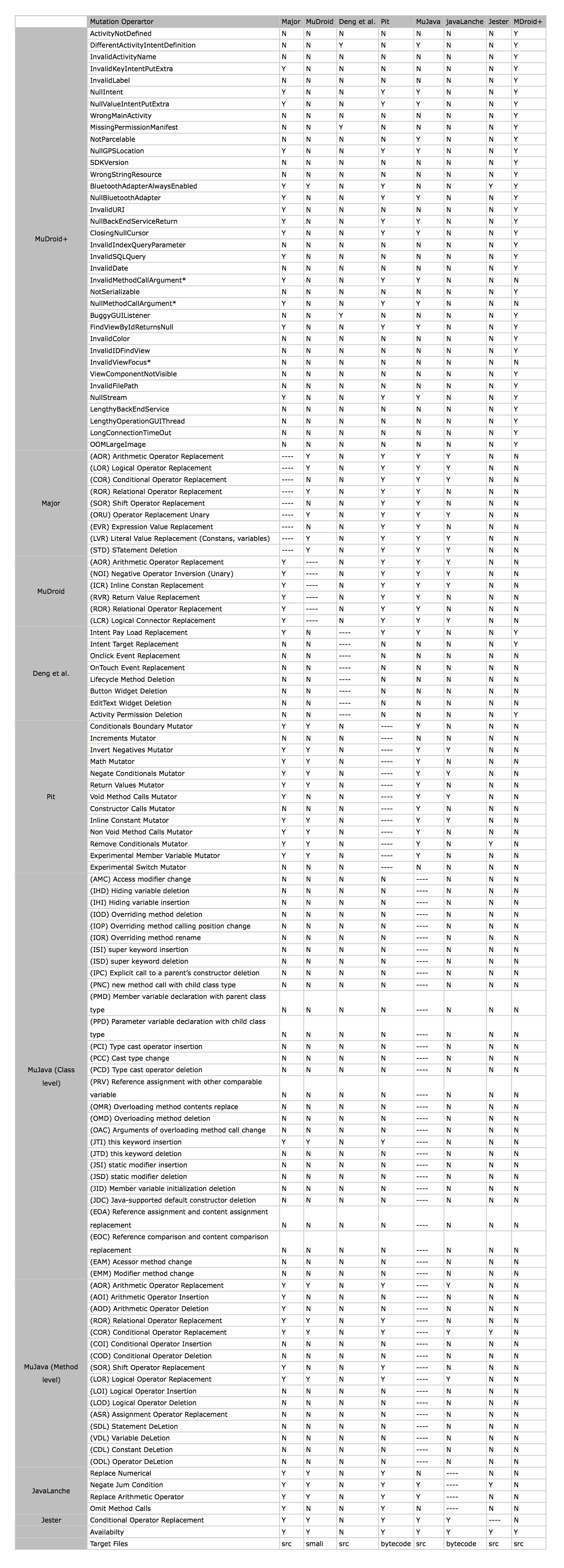
- Mutation Operators
- MDroid+ & Code
- Empirical Evaluation
- Apps Used in Study
- RQ1
- RQ2
- RQ3
- Data
Empirical Study
First Tagging Phase
In order to define our mutant taxonomy we tagged 2,023 documents sampled from six categories: (1) Bug reports of open source Android apps, (2) Bug fixing commits of open source Android apps, (3) Android-related Stack-Overflow discussions, (4) The exception hierarchy of Android APIs, (5) Crashes/bugs described in previous studies, and (6) Reviews posted by users of Android apps on the Google Play store. You can download the full dataset of all documents from which we pulled our samples by clicking the button below.
Click Here to Download Full Dataset of Taxonomy Documents
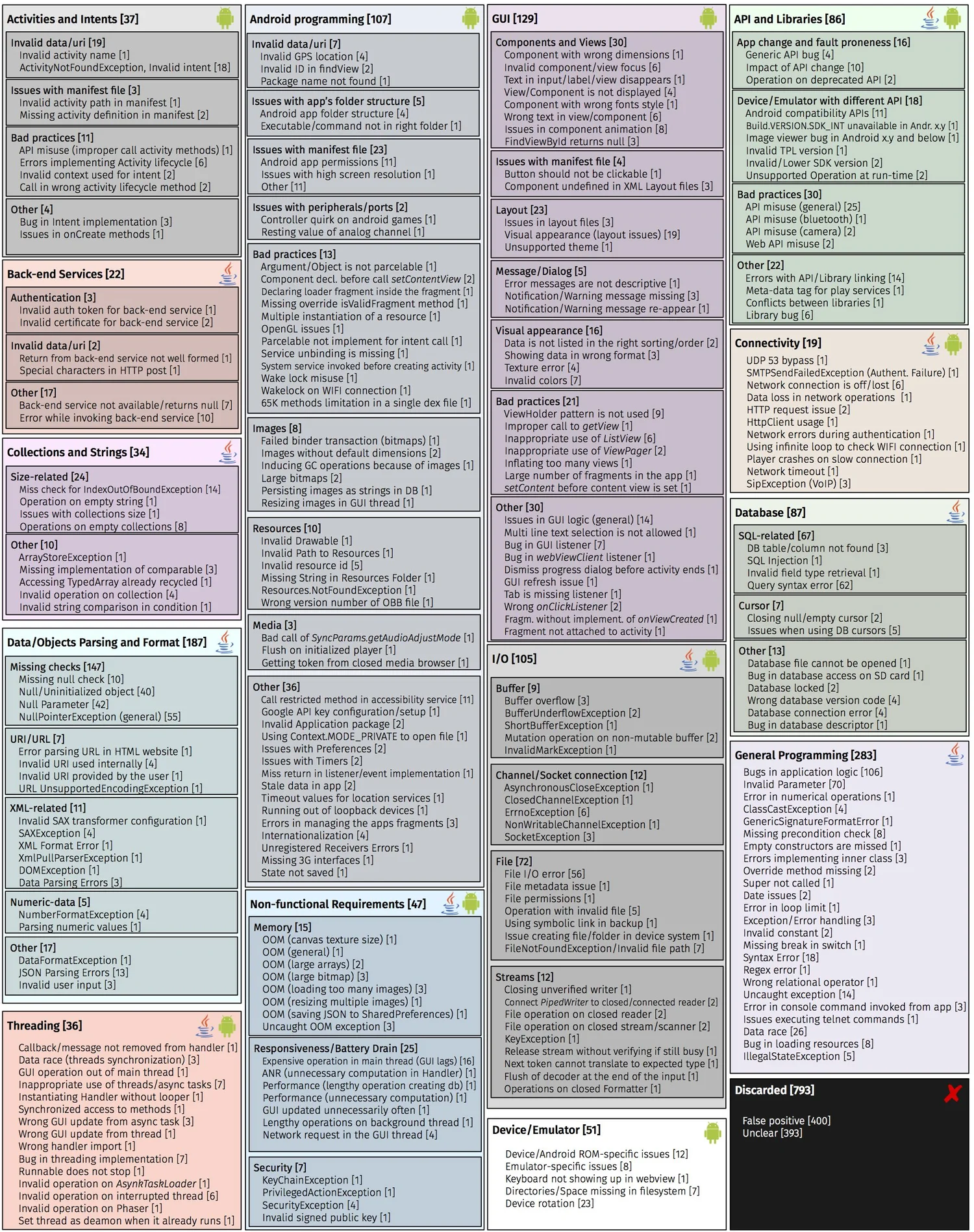
Fault Taxonomy
The black rectangle in the bottom-right part of Figure 1 reports the number of documents tagged as false positive or as un- clear. e other rectangles—marked with the Android and/or with the Java logo—represent the 14 high-level categories that we identified. Categories marked with the Android logo (e.g., Activities and Intents) group together Android-specific bugs while those marked with the Java logo (e.g., Collections and Strings) group bugs that could affect any Java application. Both symbols together indicate categories featuring both Android-specific and Java-related bugs (see e.g., I/O).
Mutation Operators
Here we provide the list of all mutations operators were defined for MDroid+.
Activity/Intents
ActivityNotDefined Text
<activity android:name=".ImportActivity" android:label="@string/title_import" />After
DifferentActivityIntentDefinition AST
Intent intent = new Intent(main.this, ImportActivity.class);After
Intent intent = new Intent(main.this, ExportActivity.class);
InvalidActivityName Text
<activity android:name=".AboutActivity" android:label="@string/title_about" />After
<activity android:name=".AbutActivity" android:label="@string/title_about" />
InvalidKeyIntentPutExtra AST
intent.putExtra(key, value);After
intent.putExtra(“ecab6839856b426fbdae3e6e8c46c38c”, value);
InvalidLabel Text
<activity android:name=".VehicleActivity" android:label="@string/title_vehicle" />After
<activity android:name=".VehicleActivity" android:label="ecab6839856b426fbdae3e6e8c46c38c" />
NullIntent AST
Intent intent = new Intent(main.this, ImportActivity.class);After
Intent intent = null;
NullValueIntentPutExtra AST
intent.putExtra(key, value);After
intent.putExtra(key, new Parcelable[0]);
WrongMainActivity Text
 <activity android:name=".Mileage" android:theme="@android:style/Theme.NoTitleBar">
	<intent-filter>
		<action android:name="android.intent.action.MAIN" />
		<category android:name="android.intent.category.LAUNCHER" />
	</intent-filter>
</activity>
After
 <activity android:name=".AboutActivity" android:theme="@android:style/Theme.NoTitleBar">
	<intent-filter>
		<action android:name="android.intent.action.MAIN" />
		<category android:name="android.intent.category.LAUNCHER" />
	</intent-filter>
</activity>
Android Programming
MissingPermissionManifest Text
<uses-permission android:name="android.permission.WRITE_EXTERNAL_STORAGE" />After
NotParcelable AST
 public class MyParcelable implements Parcelable {
     private int mData;

     @Override
     public int describeContents() {
         return 0;
     }

      @Override
     public void writeToParcel(Parcel out, int flags) {
         out.writeInt(mData);
     }
}
After public class MyParcelable {
private int mData;
public int describeContents() {
return 0;
}
public void writeToParcel(Parcel out, int flags) {
out.writeInt(mData);
}
}
NullGPSLocation AST
Location GPSLocation = new Location(provider);After
Location GPSLocation = null;
SDKVersion Text
<uses-sdk android:minSdkVersion="4" android:targetSdkVersion="10"/>After
<uses-sdk android:minSdkVersion="21" android:targetSdkVersion="10"/>
WrongStringResource Text
<string name="update_finished_importing">Import finished!</string>After
<string name="update_finished_importing">ecab6839856b426fbdae3e6e8c46c38c</string>
Back-End Services
NullBackEndServiceReturn AST
HttpResponse response = client.execute(httpGet);After
HttpResponse response = null;
Connectivity
BluetoothAdapterAlwaysEnabled AST
 BluetoothAdapter btAdapter = BluetoothAdapter.getDefaultAdapter();
if(btAdapter.isEnabled()){
	transmitData();
}
After BluetoothAdapter btAdapter = BluetoothAdapter.getDefaultAdapter();
if(true){
transmitData();
}
NullBluetoothAdapter AST
BluetoothAdapter btAdapter = BluetoothAdapter.getDefaultAdapter();After
BluetoothAdapter btAdapter = null;
Data
InvalidURI AST
URI uri = new URI(u.toString());After
URI uri = new URI(“ecab6839856b426fbdae3e6e8c46c38c”);
Database
ClosingNullCursor AST
dbcursor.close();After
 dbcursor = null;
dbcursor.close();
InvalidIndexQueryParameter AST
 String[] args = new String[]{"user1", "user2"};
db.rawQuery("SELECT * FROM USER WHERE name=? OR name=?", args);
After String[] args = new String[]{"user1", "user2"};
db.rawQuery("SELECT * FROM USER WHERE name=? OR name=?", new String[]{ });
InvalidSQLQuery AST
db.rawQuery("SELECT * FROM USER WHERE name=? OR name=?", args);
After db.rawQuery("ecab6839856b426fbdae3e6e8c46c38c", args);
General Programming
InvalidDate AST
Date stdDate = Date(year, month, date);After
Date stdDate = Date(12345678910L);
InvalidMethodCallArgument* AST
 int transaction = getTransactionValue();
setValue(transaction);
After
 int transaction = getTransactionValue();
setValue(“string”);
NotSerializable AST
 public class Book implements Serializable {
     private int mData;

	...

}
After public class Book {
private int mData;
...
}
NullMethodCallArgument* AST
 int transaction = getTransactionValue();
setValue(transaction);
After
 int transaction = getTransactionValue();
setValue(null);
GUI
BuggyGUIListener AST
 private View.OnClickListener listener = new View.OnClickListener() {
    @Override
    public void onClick(View view) {
      clicksCount += 1;
    }
}
Afterprivate View.OnClickListener listener = null;
FindViewByIdReturnsNull AST
ImageButton loadButton = (ImageButton) findViewById(R.id.load_data_button);After
ImageButton loadButton = null;
InvalidColor Text
<item name="red" type="color">#FFFF4444</item>After
<item name="red" type="color">#FF669900</item>
InvalidIDFindView AST
TextView emailTextView = (TextView) findViewById(R.id.EmailTextView);After
TextView emailTextView = (TextView) findViewById(839);
InvalidViewFocus* AST
EditText etGLNum1 = (EditText)findViewById(R.id.etGLNum1);After
 EditText etGLNum1 = (EditText)findViewById(R.id.etGLNum1);
etGLNum1.requestFocus();
ViewComponentNotVisible AST
TextView emailTextView = (TextView) findViewById(R.id.EmailTextView);After
 TextView emailTextView = (TextView) findViewById(R.id.EmailTextView);
emailTextView.setVisibility(android.view.View.INVISIBLE);
I/O
InvalidFilePath AST
File textFile = new File(“/sdcard/session.log”);After
File textFile = new File(“ecab6839856b426fbdae3e6e8c46c38c”);
NullInputStream AST
fileStream.close();After
 fileStream = null;
fileStream.close();
NullOutputStream AST
outputStream.close();After
 outputStream = null;
outputStream.close();
Non-Functional Requirements
LengthyBackEndService AST
 HttpResponse response = client.execute(httpGet);
process(response);
After
 HttpResponse response = client.execute(httpGet);
try {
	Thread.sleep(10000);
} catch (InterruptedException e) {
	e.printStackTrace();
}
process(response);
LengthyGUICreation AST
     public void onCreate(Bundle savedInstanceState) {
        super.onCreate(savedInstanceState);
        setContentView(R.layout.main);
        Toast.makeText(getApplicationContext(),"2. onCreate()", Toast.LENGTH_SHORT).show();
    }
After public void onCreate(Bundle savedInstanceState) {
super.onCreate(savedInstanceState);
try {
Thread.sleep(10000);
} catch (InterruptedException e) {
e.printStackTrace();
}
setContentView(R.layout.main);
Toast.makeText(getApplicationContext(),"2. onCreate()", Toast.LENGTH_SHORT).show();
}
LengthyGUIListener AST
 private View.OnClickListener listener = new View.OnClickListener() {
    @Override
    public void onClick(View view) {
      clicksCount += 1;
    }
After private View.OnClickListener listener = new View.OnClickListener() {
@Override
public void onClick(View view) {
clicksCount += 1;
try {
Thread.sleep(10000);
} catch (InterruptedException e) {
e.printStackTrace();
}
}
LongConnectionTimeOut AST
HttpConnectionParams.setConnectionTimeout(my_httpParams, 3000);After
HttpConnectionParams.setConnectionTimeout(my_httpParams, 100000);
OOMLargeImage AST
tower = Bitmap.createScaledBitmap(BitmapFactory.decodeResource(res), width, height,true);After
tower = Bitmap.createScaledBitmap(BitmapFactory.decodeResource(res),100000,100000,true);
MDroid+
MDroid+ Workflow Overview
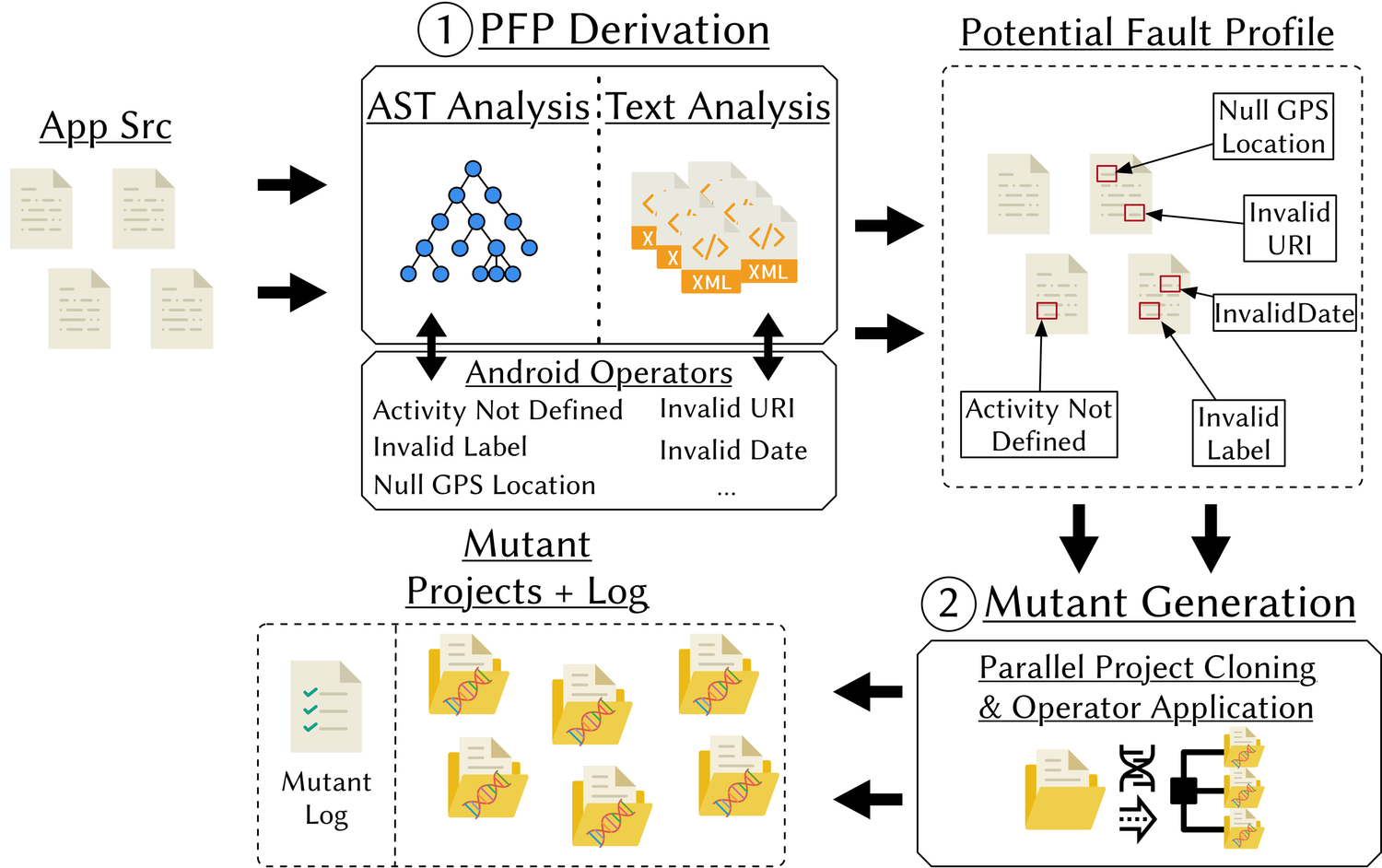
In MDroid+ we developed two wrappers that generate the mutants used in our evaluation and here you can have access to our tool and the wrappers we implemented.
MDroid+
Overview: In order the extract a Potential Fault Profile (PFP), MDroid+ statically analyzes the targeted mobile app, looking for locations where the operators from Table 1 can be implemented. The locations are detected by parsing XML files or by AST-based analysis for detecting the location of API calls. Given an PFP for an analyzed app, and the catalog of Android-speci c mutation operators, MDroid+ generates a mutant for each location in the PFP. Mutants are initially generated as clones (at source code-level) of the original app, and then the clones are automatically compiled/built into individual Android Packages (APKs). Note that each location in the PFP is related to a mutation operator. Therefore, given a location entry in the PFP, MDroid+ automatically detects the corresponding mutation operator and applies the mutation in the source code.
Wrapper for Major
Overview:In order to apply the Major mutation testing tool to Android applications, we developed a wrapper that receives the root project directoryand srcdirectory of a an Android app as input arguments. Our wrapper then compiles a list of all java files in the main package of the application and applies the Major tool to each of these files, appending information regarding the mutations to a master log file for later traceability. Major will create a number of mutants for each Java file (creating one new Java file for each injected mutant) and once this process is complete, our wrapper then makes a copy of the original Android application project, replacing a java file with one of the generated mutant files. Thus, at the end of the process, our tool creates a set of complete android app project folders, one for each mutant generated by Major, with each mutant comprising a single syntactic source code change to a single Java file. Our wrapper then compiles the applications according to the build system appropriate for the app (e.g., ant gradle).
Download Wrapper for Major Now!
Wrapper for Pit
Overview: Applying the to PIT mutation testing tool Android applications was more technically complex, due to the fact that Pit operates on Java bytecode. To accomplish this we modified a wrapperformerly created by Joel Van Den Berg which allows for writing the modified class mutant class files generated by Pit to disk. Our wrapper for Pit requires only the .apk file for an application, decompiling the executable file into its constituent .class files using the dex2jar tool, we then apply the PIT tool to each class file along the main package of the application, keeping a record of each mutation using a master log file. One the mutant class files have been created, the wrapper then assembles the mutant projects, with each mutant project (being a collection of class files), containing one mutant class file. Our wrapper then repackages the apps using a multi-threaded process to allow for more reasonable execution time. We use the dex2jar and apktool utilities to re-package the bytecode for each mutant app into an .apk file.
Empirical Evaluation
Other Mutation Frameworks
| Tool | Target Files |
|---|---|
| Major | Source Files |
| MuDroid | Smali |
| Pit | Bytecode |
| MuJava | Source Code |
| JavaLanche | Bytecode |
| Jester | Source Code |
Research Questions and Findings
RQ1
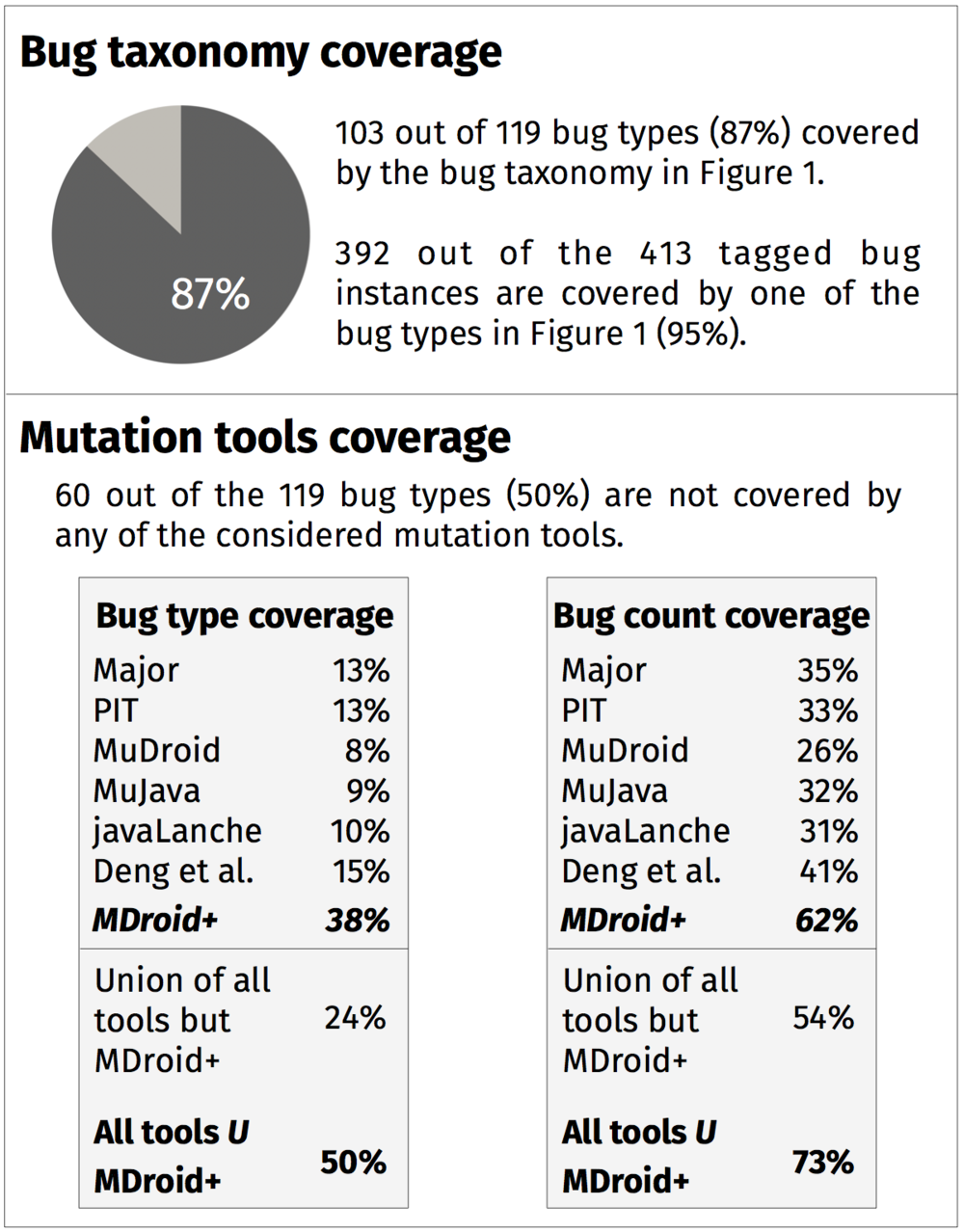
Are the mutation operators (available for Java and Android apps) representative of real bugs in Android apps?
MDroid+ outperformed the other six mutation tools by achieving the highest coverage both in terms of bug types and bug instances. However, the results shows that Android- specific mutation operators should be combined with classic operators to generate mutants that are representative of real faults in mobile apps.
Bug Types not Covered by Taxonomy
Audio codec problem
Content provider (bulk update)
Improper implementation of Sensors as Activity
Improper location for invoking db insertions
Improper usage of static in Android
Issue with JNI
Issues with visibility (modifier)
Memory leaks
NegativeArraySizeException
Performance (large amount of data to insert in content provider)
Recycled bitmap
Text encoding error
Type error
Unreachable code
Usage of relative layout as the root container
Video encoding
RQ2
What is the rate of stillborn mutants (e.g., those leading to failed compilations) and trivial mutants (e.g., those leading to crashes on app launch) produced by the studied tools when used with Android apps?
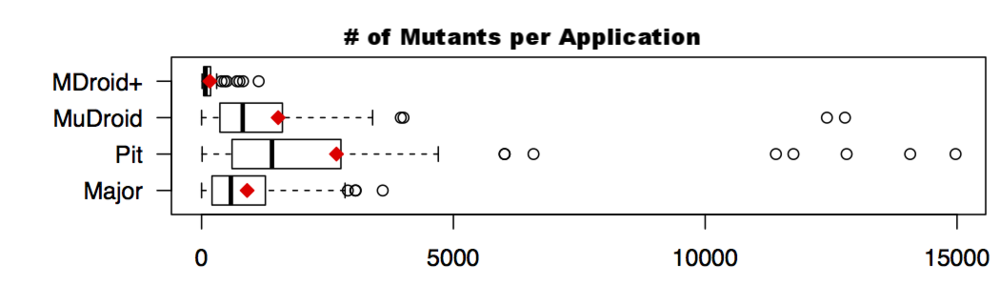
First figure depicts the achieved results as percentage of Stillborn Mutants, the second figure presents the percentage of Trivial Mutants generated by each tool on each app. Third figure shows that on average, 167, 904, 2.6k+, and 1.5k+ mutants were generated by MDroid+, Major, PIT, and muDroid, respectively for each app. The larger number of mutants generated by PIT is due in part to the larger number of mutation operators available for the tool.
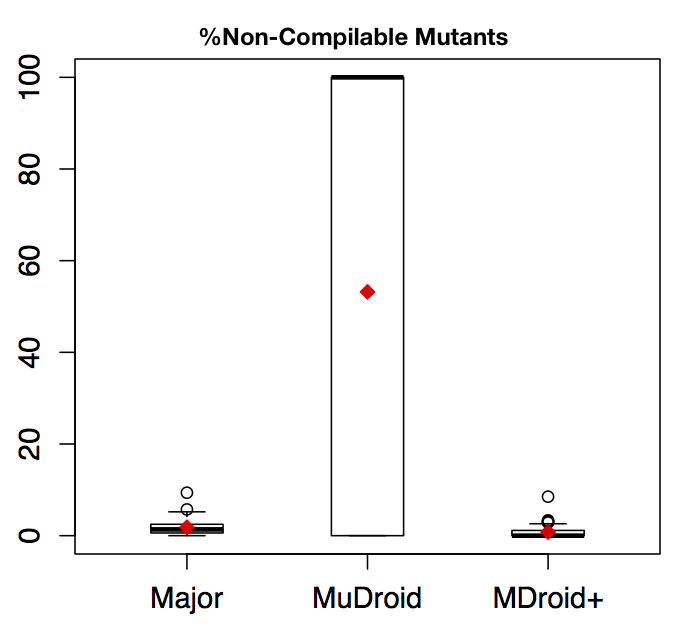
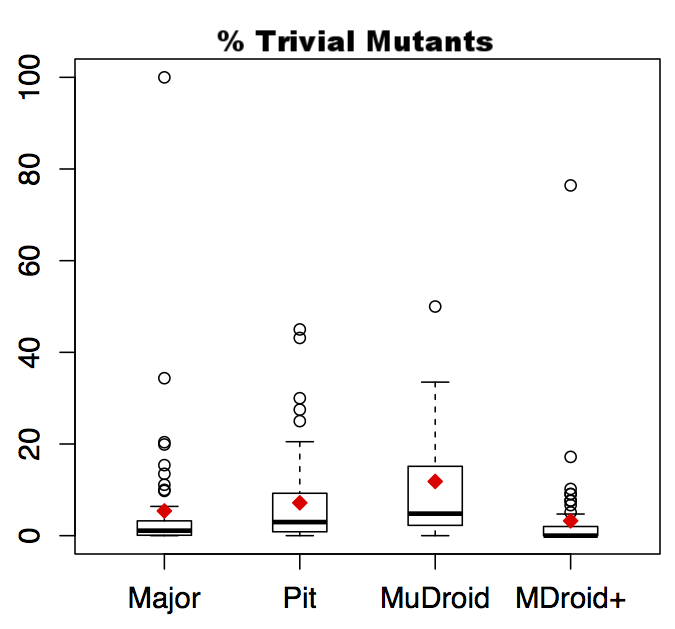
MDroid+ generated the smallest rate of both stillborn and trivial mutants illustrating its immediate applicability to Android apps. Major and muDroid generate stillborn mutants, with the latter having a critical average rate of 58.7% stillborn mutants per app.
RQ3
What are the major causes for stillborn and trivial mutants produced by the mutation testing tools when applied to Android apps?
All four tools generated a relatively low rate of trivial mutants, with muDroid again being the worst with an 11.8% average rate of trivial mutants. Our analysis shows that the PIT tool is most applicable to Android apps when evaluated in terms of the ratio between failed and generated mutants. However, MDroid+ is both practical and based on Android-specific operations implemented according to an empirically derived fault-taxonomy of Android apps.
Apps Used In Study for RQ2-RQ3
| App Name | Category | Package Name | Version |
|---|---|---|---|
| A2DP Volume | Transportation | a2dp.Vol | 2.8.11 |
| AardDictionary | Books & Reference | aarddict.android | 1.4.1 |
| FTP Server | Tools | be.ppareit.swiftp_free | 2.2 |
| Bites | Lifestyle | caldwell.ben.bites | 1.3 |
| Battery Circle | Tools | ch.blinkenlights.battery | 1.81 |
| KeePassDroid | Tools | com.android.keepass | 1.9.8 |
| LolcatBuilder | Entertainment | com.android.lolcat | 2 |
| SpriteMethodTest | Sample | com.android.spritemethodtest | 1 |
| Alarm Clock | Tools | com.angrydoughnuts.android.alarmclock | 1.7 |
| Translate | Tools | com.beust.android.translate | 1.6 |
| Manpages | Productivity | com.chmod0.manpages | 1.51 |
| BookCatalogue | Productivity | com.eleybourn.bookcatalogue | 3.8 |
| Mileage | Finance | com.evancharlton.mileage | 3.1.1 |
| Auto Answer | Tools | com.everysoft.autoanswer | 1.5 |
| Amazed | Casual | com.example.amazed | 2.0.2 |
| RandomMusicPlayer | Music | com.example.android.musicplayer | 1 |
| AnyCut | Productivity | com.example.anycut | 0.5 |
| HNDroid | News & Magazines | com.gluegadget.hndroid | 0.2.1 |
| SpriteText | Sample | com.google.android.opengles.spritetext | - |
| Triangle | Sample | com.google.android.opengles.triangle | - |
| Photostream | Media & Video | com.google.android.photostream | 1.1 |
| Multi SMS | Communication | com.hectorone.multismssender | 2.3 |
| World Clock | Tools | com.irahul.worldclock | 0.6 |
| SyncMyPix | Media & Video | com.nloko.android.syncmypix | 0.15 |
| Jamendo | Music | com.teleca.jamendo | 1.0.6-legacy |
| Yahtzee | Casual | com.tum.yahtzee | 1 |
| Sanity | Communication | cri.sanity | 2.11 |
| Mirrored | News & Magazines | de.homac.Mirrored | 0.2.3 |
| FileExplorer | Productivity | edu.killerud.fileexplorer | 1 |
| WeightChart | Health & Fitness | es.senselesssolutions.gpl.weightchart | 1.0.4 |
| SoundBoard | Sample | hiof.enigma.android.soundboard | 1 |
| ADSdroid | Books & Reference | hu.vsza.adsdroid | 1.2 |
| myLock | Tools | i4nc4mp.myLock | 42 |
| LockPatternGenerator | Tools | in.shick.lockpatterngenerator | 2 |
| MunchLife | Entertainment | info.bpace.munchlife | 1.4.2 |
| aGrep | Tools | jp.sblo.pandora.aGrep | 0.2.1 |
| CountdownTimer | Tools | net.everythingandroid.timer | 1.1.0 |
| LearnMusicNotes | Puzzle | net.fercanet.LNM | 1.2 |
| NetCounter | Tools | net.jaqpot.netcounter | 0.14.1 |
| TippyTipper | Finance | net.mandaria.tippytipper | 1.1.3 |
| BaterryDog | Tools | net.sf.andbatdog.batterydog | 0.1.1 |
| Bomber | Casual | org.beide.bomber | 1 |
| Dialer2 | Productivity | org.dnaq.dialer2 | 2.9 |
| FrozenBubble | Puzzle | org.jfedor.frozenbubble | 1.12 |
| aLogCat | Tools | org.jtb.alogcat | 2.6.1 |
| AnyMemo_135 | Education | org.liberty.android.fantastischmemo | 8.3.1 |
| PasswordMakerPro | Tools | org.passwordmaker.android | 1.1.7 |
| Blokish | Puzzle | org.scoutant.blokish | 2 |
| ZooBorns | Entertainment | org.smerty.zooborns | 1.4.4 |
| Wordpress_394 | Productivity | org.tomdroid | 0.5.0 |
| MyExpenses | Finance | org.totschnig.myexpenses | 1.6.0 |
| ImportContacts | Tools | org.waxworlds.edam.importcontacts | 1.1 |
| Wikipedia | Books & Reference | org.wikipedia | 1.2.1 |
Study Data
Please click the button below to obtain a copy of the data generated for each Mutation framework relating to RQ2 & RQ3 outlined above.
Click Here to Download Study Data!
Operators Across Tools